
AI-augmented system streamlining the read-to-note workflow
AI-augmented system streamlining the read-to-note workflow
AI-augmented system streamlining the read-to-note workflow
Lumière is an AI-driven reading and knowledge management system designed to bridge the gap between rapid information discovery and structured long-term retention.
As the sole product designer and full-stack developer, I designed the system architecture and UI in parallel.
I focused on creating a seamless cognitive loop: lightweight discovery for information intake, and AI-powered "Bookshelf" that transforms fragmented, unstructured thoughts into a persistent knowledge base.
Lumière is an AI-driven reading and knowledge management system designed to bridge the gap between rapid information discovery and structured long-term retention.
As the sole product designer and full-stack developer, I designed the system architecture and UI in parallel.
I focused on creating a seamless cognitive loop: lightweight discovery for information intake, and AI-powered "Bookshelf" that transforms fragmented, unstructured thoughts into a persistent knowledge base.
Year
Mar 2025
Tech stack
React, TypeScript, Vite
Gemini API, Supabase
Capacitor (iOS Shell)
type
Individual Project
Role
Product Designer & Full-stack Developer
DELIVERABLES
Functional iOS Prototype
AI Workflow Architecture
Design System
Background
The Broken Bridge Between Reading and Remembering
The Broken Bridge Between Reading and Remembering
We have more information than ever, but less retention. We use phone to discover, "Read Later" apps to save, and Notion to store notes.
We have more information than ever, but less retention. We use phone to discover, "Read Later" apps to save, and Notion to store notes.

[fig 1]
Image of A Woman Endlessly Swiping her phone
We swipe through endless feeds but rarely internalize the content.

[fig 1]
Image of A Man Trying to Take Notes
Moving a highlight to a knowledge base requires effort that most users (including me) eventually give up.
The problem isn’t the content itself, but rather the effort involved in moving information from one place to another. For most people, “saving it for later” usually means they’ll forget all about it.
Why This Matter?
At the moment, tools for reading do not do the same as tools for note-taking. The process of copying, switching apps and manually adding tags creates a "friction tax" that causes most users to abandon their highlights before they can learn from them.
At the moment, tools for reading do not do the same as tools for note-taking. The process of copying, switching apps and manually adding tags creates a "friction tax" that causes most users to abandon their highlights before they can learn from them.
Stakeholder Interview
Stakeholder Interview
To validate these assumptions, I ran quick interviews with five active readers.
To validate these assumptions, I ran quick interviews with five active readers.
The problem is too easy to Save and Forget
The problem is too easy to Save and Forget
If you can't process notes as soon as you read them, they simply become dark data: stored but never used.
If you can't process notes as soon as you read them, they simply become dark data: stored but never used.
My Notion is where articles die. I have over 50 pages in my Notion database but I can't remember the last time I actually read them
"Student at UW
My Notion is where articles die. I have over 50 pages in my Notion database but I can't remember the last time I actually read them
"Student at UW
My Notion is where articles die. I have over 50 pages in my Notion database but I can't remember the last time I actually read them
"Student at UW
Current Platform
Current Platform
Existing tools either focus on content delivery (e.g., Medium, News) or storing raw data (Notion/Pocket), but they lack a seamless, lightweight way to transition from reading to note-taking, as well as a long-term path for revisiting and digesting information.
Existing tools either focus on content delivery (e.g., Medium, News) or storing raw data (Notion/Pocket), but they lack a seamless, lightweight way to transition from reading to note-taking, as well as a long-term path for revisiting and digesting information.
RESEARCH INSIGHT
High Barrier for Structuring Fragmented Insights
Notes captured by users are often left as messy, unstructured fragments because categorizing them and building a knowledge database is too exhausting for mobile users.
Notes captured by users are often left as messy, unstructured fragments because categorizing them and building a knowledge database is too exhausting for mobile users.
Knowledge Decay & The AI Hallucination Gap
Users often forget the context of their highlights, and AI tends to provide generic answers because it lacks access to the specific source text and the user’s personal notes.
Users often forget the context of their highlights, and AI tends to provide generic answers because it lacks access to the specific source text and the user’s personal notes.
PROBLEM STATEMENT
How can we design a lightweight mobile system that automates the transition from reading to structured knowledge, ensuring AI insights are grounded in the user's specific context?
How can we design a lightweight mobile system that automates the transition from reading to structured knowledge, ensuring AI insights are grounded in the user's specific context?
Design Strategy
The core strategy is to eliminate manual steps in the knowledge workflow. By no longer treating reading, analysis, and organization as three separate tasks, but instead redesigning this process as a continuous cycle within a single system, users can focus entirely on thinking.
The core strategy is to eliminate manual steps in the knowledge workflow. By no longer treating reading, analysis, and organization as three separate tasks, but instead redesigning this process as a continuous cycle within a single system, users can focus entirely on thinking.
Seamless Info Intake
Combining content discovery with real-time analysis allows users to delve deeper into the discovery process without interruption.
Autonomous Database
Removes the burden of manual tagging. AI parses unstructured "brain dumps" into a structured Bookshelf while synthesizing in-situ insights.
TECHNOLOGIES
How AI Intervenes
Instead of treating AI as a separate chatbot, I integrated it as a processor that processes raw input and structured output. AI interventions are strategically placed at the two biggest friction points identified in research: The Structural Barrier and The Context Decay.
Instead of treating AI as a separate chatbot, I integrated it as a processor that processes raw input and structured output. AI interventions are strategically placed at the two biggest friction points identified in research: The Structural Barrier and The Context Decay.
DEsign Principles
Instead of treating AI as a separate chatbot, I integrated it as a processor that processes raw input and structured output. AI interventions are strategically placed at the two biggest friction points identified in research: The Structural Barrier and The Context Decay.
Instead of treating AI as a separate chatbot, I integrated it as a processor that processes raw input and structured output. AI interventions are strategically placed at the two biggest friction points identified in research: The Structural Barrier and The Context Decay.
Principle #1
Low Cognitive Load
Principle #1
Low Cognitive Load
Principle #2
Frictionless
Principle #2
Frictionless
Principle #3
Passive Resurfacing
Principle #3
Passive Resurfacing
Principle #3
Passive Resurfacing
PRODUCTION
Design to Coding and Coding for Design
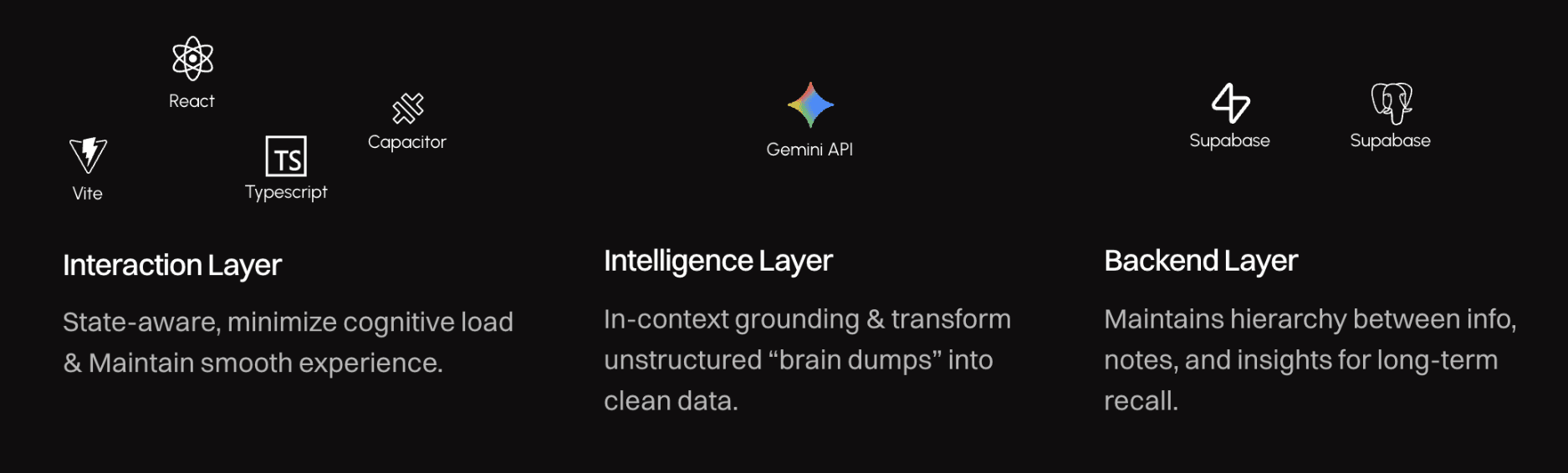
I adopted a hybrid production workflow by building functional prototypes alongside UI design. This allowed for real-time validation of interactions and used coding as a diagnostic tool to refine the design system based on technical constraints.
I adopted a hybrid production workflow by building functional prototypes alongside UI design. This allowed for real-time validation of interactions and used coding as a diagnostic tool to refine the design system based on technical constraints.

React
Vite
Typescript
Capacitor
Interaction Layer
State-aware, minimize cognitive load & Maintain smooth experience.

Gemini API
Intelligence Layer
In-context grounding & transform unstructured “brain dumps” into clean data.
Supabase
PostgreSQL
Backend Layer
Maintains hierarchy between info, notes, and insights for long-term recall.
Final Design
A SEAMLESS KNOWLEDGE ECOSYSTEM
Mobile-first environment that automates the transition from reading to structured learning. By integrating AI at the database level, the interface remains minimal while the backend handles the complex task of organizing and resurfacing information.
Mobile-first environment that automates the transition from reading to structured learning. By integrating AI at the database level, the interface remains minimal while the backend handles the complex task of organizing and resurfacing information.
Details
/01 The Bookshelf
Unstructured "Brain Dumps"
Users capture raw thoughts or quotes, which the AI autonomously parses and maps into a structured database.
Users capture raw thoughts or quotes, which the AI autonomously parses and maps into a structured database.
Creates a structured hierarchy (Author → Book → Insight) rather than a flat, unsearchable list.
Creates a structured hierarchy (Author → Book → Insight) rather than a flat, unsearchable list.
/02 Daily Reads
Efficient Intake
A swipe-driven RSS feed allows users to quickly filter high-signal articles, reducing the cognitive load of content discovery.
A swipe-driven RSS feed allows users to quickly filter high-signal articles, reducing the cognitive load of content discovery.
In-Context AI Dialogue
In-reader section-by-section analysis provides grounded AI summaries, eliminating app-switching for research.
In-reader section-by-section analysis provides grounded AI summaries, eliminating app-switching for research.
/03 Home Recap
Automated Insight Carousel
The home screen features a dynamic "recap shelf" that cycles through previously captured notes.
The home screen features a dynamic "recap shelf" that cycles through previously captured notes.
Low-Barrier Interaction
Users can edit, favorite, or refresh their memory of old insights directly from the dashboard, turning a static archive into an active learning loop.
Users can edit, favorite, or refresh their memory of old insights directly from the dashboard, turning a static archive into an active learning loop.
OUTCOME
This project successfully validated the feasibility of an AI-native "Read-to-Note" loop, transforming a high-friction manual process into a streamlined experience.
This project successfully validated the feasibility of an AI-native "Read-to-Note" loop, transforming a high-friction manual process into a streamlined experience.
#1
Functional MVP
#1
Functional MVP
#2
Workflow Design
#2
Workflow Design
#3
Contextual Accuracy
#3
Contextual Accuracy
#3
Contextual Accuracy
Reflection
AI as a Design Material
Through the "Vibe Coding" process, I realized that AI is not just a feature to be added, but a core design material. Coding the logic while designing the UI helped me understand AI's latency, its constraints, and its potential to serve as a semantic glue that holds fragmented workflows together.
Managing asynchronous AI latency taught me the importance of perceived speed. I used optimistic UI and skeleton loaders to maintain user momentum.
This project also reinforced the importance of a hybrid workflow, where seamlessly bridging the gap between Figma prototype and database guaranteed that the product was visually appealing and technically robust.
Through the "Vibe Coding" process, I realized that AI is not just a feature to be added, but a core design material. Coding the logic while designing the UI helped me understand AI's latency, its constraints, and its potential to serve as a semantic glue that holds fragmented workflows together.
Managing asynchronous AI latency taught me the importance of perceived speed. I used optimistic UI and skeleton loaders to maintain user momentum.
This project also reinforced the importance of a hybrid workflow, where seamlessly bridging the gap between Figma prototype and database guaranteed that the product was visually appealing and technically robust.